Cluster Security
Security in a homelab environment can feel optional — but treating it as a first-class concern means the skills and patterns developed here transfer directly to production. This cluster implements defense-in-depth across secrets management, TLS certificate automation, container image scanning, network encryption, and disaster recovery.
Sealed Secrets — Encrypted Secrets in Git
Section titled “Sealed Secrets — Encrypted Secrets in Git”One of the core principles of GitOps is that everything is in Git. But Kubernetes Secret objects are only base64-encoded — not encrypted. Committing them to a repository is a serious security risk.
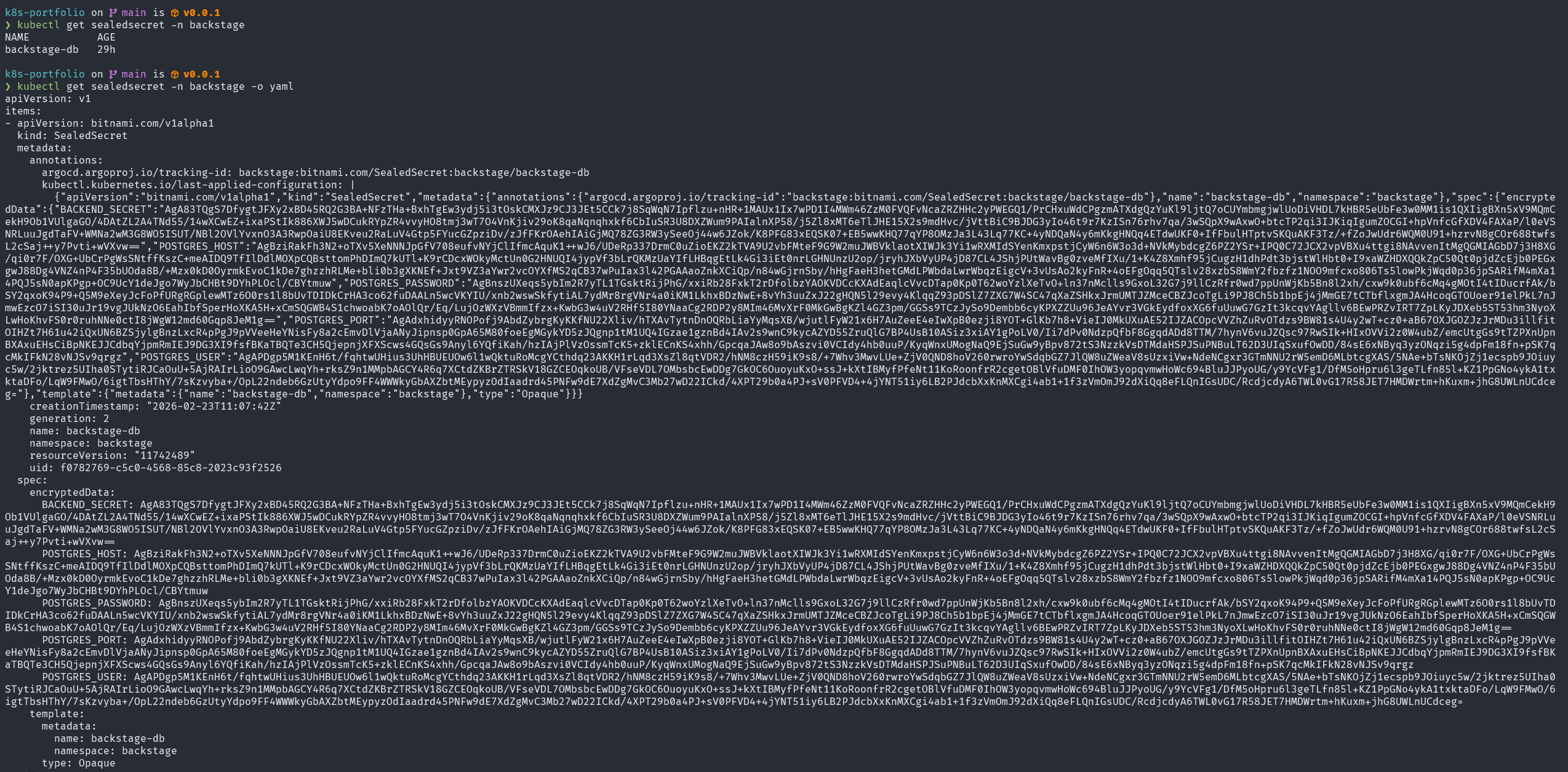
Sealed Secrets (by Bitnami) solves this with asymmetric encryption. A controller running inside the cluster holds a private key. The corresponding public key is used to encrypt secrets locally, producing a SealedSecret resource that can be safely committed to Git.
How It Works
Section titled “How It Works”Developer machine Kubernetes cluster │ │ │ 1. Create plain Secret │ │ (never committed) │ │ │ │ 2. kubeseal --format yaml │ │ (fetches public key) │ │ │ │ │ ▼ │ │ SealedSecret YAML ──────────►│ sealed-secrets-controller │ (safe to commit) │ decrypts with private key │ │ │ │ 3. git commit sealed-secret │ ▼ │ to backstage-gitops │ plain Secret created │ │ in clusterThe sealed data looks like this in the GitOps repository:
apiVersion: bitnami.com/v1alpha1kind: SealedSecretmetadata: name: backstage-db namespace: backstagespec: encryptedData: POSTGRES_HOST: AgBziRak... # ciphertext — safe in Git POSTGRES_USER: AgAPDgp5... POSTGRES_PASSWORD: AgBnsz... POSTGRES_PORT: AgAdxhid... BACKEND_SECRET: AgA83TQg... template: metadata: name: backstage-db namespace: backstage type: OpaqueThe backstage-db SealedSecret contains all database connection credentials for the Backstage application. These values are decrypted automatically by the sealed-secrets-controller (running in kube-system) every time ArgoCD syncs.
Why This Is Better Than Alternatives
Section titled “Why This Is Better Than Alternatives”| Approach | In Git | Encrypted | Cluster-managed |
|---|---|---|---|
| Plain Secret | ❌ (never) | ❌ | ✓ |
| ConfigMap with secrets | ❌ (dangerous) | ❌ | ✓ |
| Vault + Vault Agent | ✓ (references) | ✓ | ✓ |
| Sealed Secrets | ✓ (ciphertext) | ✓ | ✓ |
| External Secrets + AWS SM | ✓ (references) | ✓ | ✓ |
Sealed Secrets is the pragmatic choice for a homelab: zero external dependencies, zero ongoing cost, and complete GitOps compatibility.
The sealed-secrets-controller runs in kube-system:
kube-system sealed-secrets-controller-869f4b696b 1/1 Running 27hHarbor — Private Container Registry
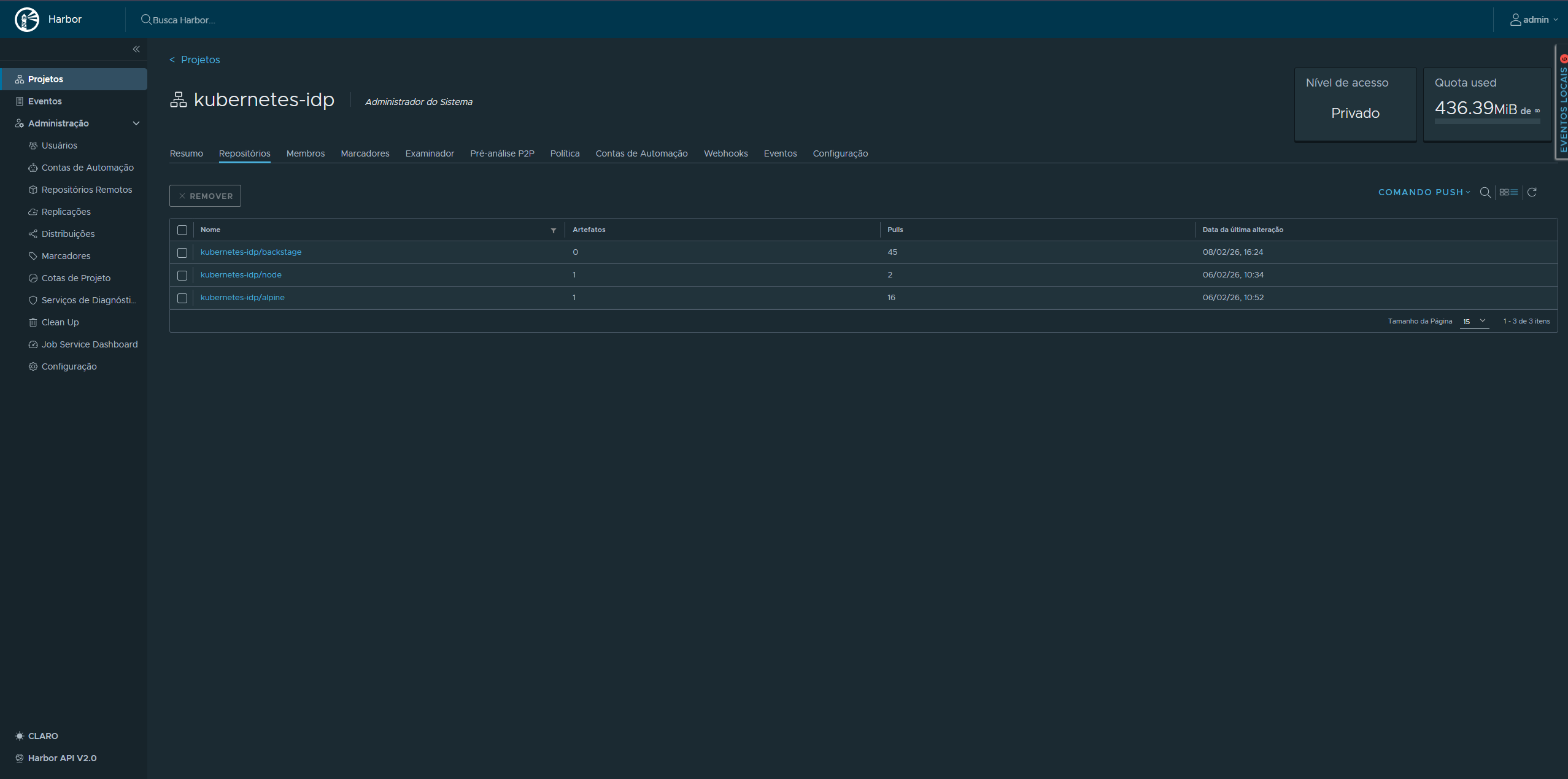
Section titled “Harbor — Private Container Registry”Harbor is the private container registry running in the harbor namespace. All custom container images built in CI are pushed to GHCR (GitHub Container Registry), but Harbor serves as the internal registry for any air-gapped image mirroring and provides the full image lifecycle management features that GHCR does not.
Harbor Components
Section titled “Harbor Components”| Pod | Role |
|---|---|
harbor-core | Core API and registry logic |
harbor-registry | OCI-compliant image storage (2 containers: registry + registryctl) |
harbor-nginx | Reverse proxy and TLS termination |
harbor-portal | Web UI |
harbor-jobservice | Async jobs: replication, garbage collection |
harbor-database | PostgreSQL (StatefulSet) |
harbor-redis | Session cache and job queue |
harbor-trivy | Vulnerability scanner |
Harbor is accessed at harbor.kubefurlan.com (via Traefik HTTPRoute) and uses a cert-manager-issued TLS certificate (harbor-tls).
Trivy Vulnerability Scanning
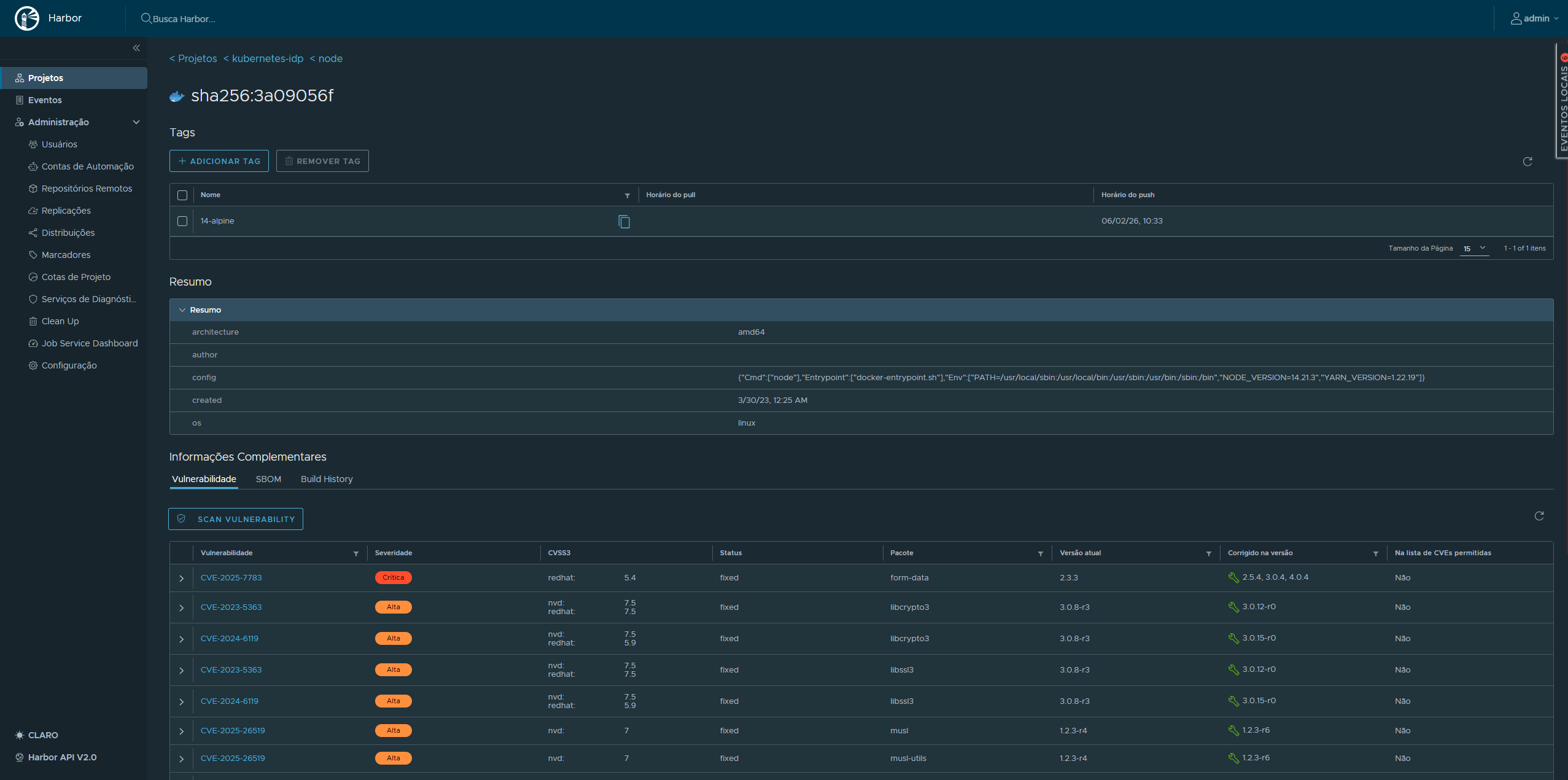
Section titled “Trivy Vulnerability Scanning”Every image pushed to Harbor is automatically scanned by Trivy, which checks for:
- Known CVEs in OS packages (Alpine, Debian, Ubuntu, etc.)
- Application dependency vulnerabilities (npm, pip, Maven, Go modules)
- Configuration issues (misconfigurations, secret leaks)
Scan results are visible in the Harbor UI per image, per tag. Policies can be configured to block image pulls if critical vulnerabilities are detected.
TLS Certificate Management — cert-manager
Section titled “TLS Certificate Management — cert-manager”All HTTPS traffic in the cluster is terminated with certificates managed by cert-manager. Two ClusterIssuer resources cover different use cases:
letsencrypt-prod (Production TLS)
Section titled “letsencrypt-prod (Production TLS)”Uses the ACME DNS-01 challenge via the Cloudflare API to issue certificates for *.kubefurlan.com and kubefurlan.com. DNS-01 is required because the cluster is not publicly reachable over HTTP (port 80 is not forwarded on the home router) — but Cloudflare DNS validation works purely over the Cloudflare API.
apiVersion: cert-manager.io/v1kind: ClusterIssuermetadata: name: letsencrypt-prodspec: acme: server: https://acme-v02.api.letsencrypt.org/directory solvers: - dns01: cloudflare: apiTokenSecretRef: name: cloudflare-api-token key: api-tokenselfsigned-issuer (Internal TLS)
Section titled “selfsigned-issuer (Internal TLS)”Used for internal services and as a bootstrap issuer for cert-manager’s own webhook certificate. Self-signed certificates are suitable for cluster-internal communication where the CA is explicitly trusted.
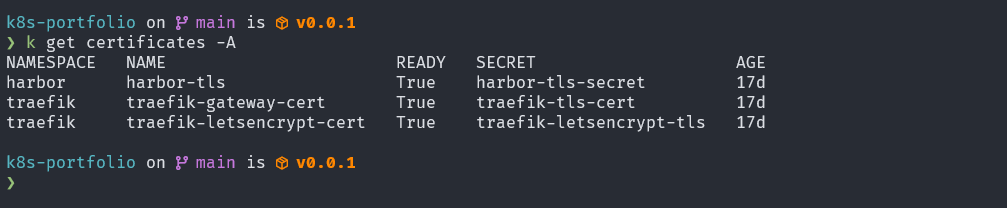
Active Certificates
Section titled “Active Certificates”| Certificate | Namespace | Issuer | Status |
|---|---|---|---|
harbor-tls | harbor | letsencrypt-prod | Ready |
traefik-gateway-cert | traefik | selfsigned-issuer | Ready |
traefik-letsencrypt-cert | traefik | letsencrypt-prod | Ready |
Certificates are automatically renewed by cert-manager before expiry. The renewal process requires no manual intervention.
Network Security — Cilium
Section titled “Network Security — Cilium”Cilium is used as the CNI plugin, responsible for pod networking and NetworkPolicy enforcement. The standard kube-proxy handles service routing. Cilium’s role here is network isolation — restricting which pods and namespaces can communicate with each other and with the outside world.
Network Policy Enforcement
Section titled “Network Policy Enforcement”Cilium enforces standard Kubernetes NetworkPolicy resources and extends them with CiliumNetworkPolicy for L7-aware policies. Network policies can restrict:
- Which pods can communicate with which other pods
- Which namespaces can communicate
- Which external IPs are reachable from the cluster
This means a compromised application pod cannot freely reach other workloads, databases, or the Kubernetes API — traffic must be explicitly allowed.
API Server Audit Logging
Section titled “API Server Audit Logging”The kube-apiserver is configured with an audit policy that records every significant request made to the Kubernetes API — who made it, what resource was affected, and what the outcome was. On a kubeadm cluster, this is enabled by adding --audit-policy-file and --audit-log-path to the API server’s static pod manifest.
Audit Policy
Section titled “Audit Policy”The audit policy defines what events to capture at what verbosity level. Four verbosity levels exist:
| Level | What is recorded |
|---|---|
None | Request is not logged |
Metadata | Request metadata only (user, verb, resource, time) — no request/response body |
Request | Metadata + request body |
RequestResponse | Metadata + request body + response body |
A typical policy logs high-sensitivity operations at full verbosity while keeping noise low for read-heavy resources:
apiVersion: audit.k8s.io/v1kind: Policyrules:  # Do not log read-only requests to non-sensitive resources  - level: None    verbs: ["get", "list", "watch"]    resources:      - group: ""        resources: ["endpoints", "services", "configmaps"]
  # Full detail for Secret access  - level: RequestResponse    resources:      - group: ""        resources: ["secrets"]
  # Metadata for everything else  - level: Metadata
Why Audit Logging Matters
Section titled “Why Audit Logging Matters”Without audit logs, there is no post-incident record of what happened in the cluster. Audit logging answers:
- Which user or ServiceAccount created, modified, or deleted a resource?
- Were any Secrets accessed or exported?
- Did any pod exec into a running container?
- Were any RBAC rules changed?
On musashi, audit logs are written to the host filesystem and collected by Grafana Alloy (via the systemd journal or log file scraping) and forwarded to Loki, making them queryable from Grafana alongside application logs.
etcd Encryption at Rest
Section titled “etcd Encryption at Rest”By default, Kubernetes stores everything in etcd as plain JSON — including Secret objects. Anyone with read access to the etcd data directory (e.g., from a disk snapshot or physical access to the node) can extract all Secrets in plaintext using etcdctl.
Encryption at rest solves this by encrypting the data before it is written to etcd. On musashi, this is configured via the --encryption-provider-config flag on the kube-apiserver static pod, pointing to an EncryptionConfiguration manifest.
EncryptionConfiguration
Section titled “EncryptionConfiguration”apiVersion: apiserver.config.k8s.io/v1kind: EncryptionConfigurationresources: - resources: - secrets providers: - aescbc: keys: - name: key1 secret: <base64-encoded-32-byte-key> - identity: {}How this works:
- When a
Secretis written to etcd, the kube-apiserver encrypts it using AES-CBC with a 32-byte key before storing it. - When a
Secretis read, the kube-apiserver decrypts it in memory before returning it to the caller. - The
identity: {}provider at the end allows reading pre-existing unencrypted secrets during a migration — once all secrets are re-written, it can be removed.
Verifying Encryption
Section titled “Verifying Encryption”After enabling encryption and re-writing existing secrets, you can verify that etcd no longer stores them in plaintext:
# Read the raw etcd value for a secretETCDCTL_API=3 etcdctl \  --cacert=/etc/kubernetes/pki/etcd/ca.crt \  --cert=/etc/kubernetes/pki/etcd/server.crt \  --key=/etc/kubernetes/pki/etcd/server.key \  get /registry/secrets/default/my-secret | hexdump -C | head
# An encrypted secret starts with the prefix: k8s:enc:aescbc:v1:key1:...# A plaintext secret starts with: {"kind":"Secret"...
Why This Is Important
Section titled “Why This Is Important”| Scenario | Without encryption | With encryption |
|---|---|---|
| Physical access to node disk | All Secrets readable | Ciphertext only — key required |
| etcd backup/snapshot leak | All Secrets readable | Ciphertext only |
| Etcd port exposed (misconfiguration) | All Secrets readable | Ciphertext only |
| kubectl get secret | Works normally | Works normally (decrypted in memory) |
Encryption at rest is a complementary control to RBAC: RBAC prevents unauthorized API access, while encryption at rest protects the data if the storage layer is compromised independently of the API.
Backup and Disaster Recovery
Section titled “Backup and Disaster Recovery”Security includes the ability to recover from failures. Since this is a single-node cluster with no built-in redundancy, disaster recovery depends entirely on a well-tested backup strategy.
The backup strategy spans four layers — Velero + Kopia for Kubernetes resources and PV data, restic for raw PVC data and host configuration, and pg_dumpall for PostgreSQL logical backups. All data is stored in OCI Object Storage (Oracle Cloud, São Paulo region, 20 GB free tier). Backup health is monitored in real time via Prometheus Pushgateway and a custom Grafana dashboard, with Telegram + Gmail alerts for failures.
Full backup strategy and monitoring documentation →
Alert Coverage
Section titled “Alert Coverage”| Alert | Trigger |
|---|---|
BackupFailed | Any backup job reports backup_success == 0 |
BackupStale | More than 48 hours since last successful backup |
OCIBucketNearLimit | Bucket usage > 85% of 20 GB free tier |
RBAC and Access Control
Section titled “RBAC and Access Control”Since this is a single-node homelab with a single administrator, RBAC complexity is minimal but the standard Kubernetes RBAC model is fully enforced:
- Sealed Secrets controller runs with its own ServiceAccount scoped to reading/writing Secrets
- ArgoCD uses the Kubernetes RBAC system, with its application controller having cluster-admin rights (scoped to the
defaultproject) - Velero runs with cluster-admin to be able to backup/restore any resource
- cert-manager uses scoped RBAC to manage its own CRDs and create Secrets for certificates
Security Surface Summary
Section titled “Security Surface Summary”| Concern | Mitigation |
|---|---|
| Secrets in Git | Sealed Secrets (asymmetric encryption) |
| Unscanned images | Harbor + Trivy vulnerability scanning |
| Expired TLS certs | cert-manager with auto-renewal |
| Data loss | Velero + Kopia + restic + OCI Object Storage |
| Network isolation | Cilium NetworkPolicy (pod-level traffic control) |
| Backup failures | Prometheus alerts → Telegram + Gmail |
| Unauthorized cluster access | kubeconfig on local machine only, no public API server |
| API activity visibility | kube-apiserver audit logging → Loki |
| Secrets at rest | etcd encryption at rest (AES-CBC) |