Skip to content

Observability Stack

Observability is not an afterthought in this homelab β€” it’s a first-class concern. Every workload is monitored, every log line is indexed, and every alert has a defined routing policy. The stack is designed to answer three questions: What is the system doing right now? What happened in the past? What should I be notified about?

The stack runs entirely in the monitoring namespace and is composed of well-established open-source projects, deployed via Helm.

β”Œβ”€β”€β”€β”€β”€β”€β”€β”€β”€β”€β”€β”€β”€β”€β”€β”€β”€β”€β”€β”€β”€β”€β”€β”€β”€β”€β”€β”€β”€β”€β”€β”€β”€β”€β”€β”€β”€β”€β”€β”€β”€β”€β”€β”€β”€β”€β”€β”€β”€β”€β”€β”€β”€β”€β”€β”€β”€β”€β”€β”€β”€β”€β”€β”€β”€β”
β”‚ Grafana β”‚
β”‚ grafana.kubefurlan.com β”‚
β”‚ (dashboards, explore, alerting) β”‚
β”œβ”€β”€β”€β”€β”€β”€β”€β”€β”€β”€β”€β”€β”€β”€β”¬β”€β”€β”€β”€β”€β”€β”€β”€β”€β”€β”€β”€β”€β”€β”¬β”€β”€β”€β”€β”€β”€β”€β”€β”€β”€β”€β”€β”€β”€β”€β”€β”€β”€β”€β”€β”€β”€β”€β”€β”€β”€β”€β”€β”€β”€β”€β”€β”€β”€β”€β”€
β”‚ Metrics β”‚ Logs β”‚ Probes β”‚
β”‚ Prometheus β”‚ Loki β”‚ Blackbox Exporter β”‚
β”œβ”€β”€β”€β”€β”€β”€β”€β”€β”€β”€β”€β”€β”€β”€β”΄β”€β”€β”€β”€β”€β”€β”€β”€β”€β”€β”€β”€β”€β”€β”΄β”€β”€β”€β”€β”€β”€β”€β”€β”€β”€β”€β”€β”€β”€β”€β”€β”€β”€β”€β”€β”€β”€β”€β”€β”€β”€β”€β”€β”€β”€β”€β”€β”€β”€β”€β”€
β”‚ Collectors β”‚
β”‚ Grafana Alloy (DaemonSet) ── K8s pod logs + host journal β”‚
β”‚ Node Exporter ── host metrics (CPU, mem, disk, systemd) β”‚
β”‚ kube-state-metrics ── K8s object metrics β”‚
β”‚ Pushgateway ── batch job metrics (backups, OCI bucket) β”‚
β”œβ”€β”€β”€β”€β”€β”€β”€β”€β”€β”€β”€β”€β”€β”€β”€β”€β”€β”€β”€β”€β”€β”€β”€β”€β”€β”€β”€β”€β”€β”€β”€β”€β”€β”€β”€β”€β”€β”€β”€β”€β”€β”€β”€β”€β”€β”€β”€β”€β”€β”€β”€β”€β”€β”€β”€β”€β”€β”€β”€β”€β”€β”€β”€β”€β”€β”€
β”‚ Alerting β”‚
β”‚ AlertManager ──► Telegram bot + Gmail β”‚
β””β”€β”€β”€β”€β”€β”€β”€β”€β”€β”€β”€β”€β”€β”€β”€β”€β”€β”€β”€β”€β”€β”€β”€β”€β”€β”€β”€β”€β”€β”€β”€β”€β”€β”€β”€β”€β”€β”€β”€β”€β”€β”€β”€β”€β”€β”€β”€β”€β”€β”€β”€β”€β”€β”€β”€β”€β”€β”€β”€β”€β”€β”€β”€β”€β”€β”˜
ComponentHelm ChartVersionTypePurpose
kube-prometheus-stackprometheus-community/kube-prometheus-stack81.6.4DeploymentPrometheus, Grafana, AlertManager, node-exporter, kube-state-metrics
Lokigrafana/lokiβ€”StatefulSetLog storage and querying (monolithic mode)
Grafana Alloygrafana/alloyβ€”DaemonSetLog collection (K8s pods + host systemd journal)
Pushgatewayprometheus-community/prometheus-pushgatewayβ€”DeploymentReceives metrics from batch jobs
Blackbox Exporterprometheus-community/prometheus-blackbox-exporterβ€”DeploymentHTTP endpoint probing

Prometheus is the time-series metrics database at the heart of the stack. It scrapes metrics from all configured targets on a pull model and stores them with a 5-day retention window in a 10 GiB PVC backed by local-path storage.

Host Metrics

via Node Exporter (DaemonSet)

  • CPU usage per core and aggregate
  • Memory usage and availability
  • Disk I/O and filesystem usage
  • Network traffic
  • System load average
  • Systemd service states: AdGuardHome, restic-k8s-backup, restic-host-backup, pg-dump, oci-bucket-stats

Kubernetes Metrics

via kube-state-metrics

  • Pod status, restarts, resource requests/limits
  • Deployment and StatefulSet health
  • PersistentVolume usage
  • Node conditions
  • API server request rates

Batch Job Metrics

via Pushgateway

Backup scripts and cron jobs push metrics after completion:

  • restic_k8s_data: success, duration, files_new, files_changed
  • restic_host: success, duration, timestamp
  • pg_dump: success, duration, dump_size_bytes
  • oci_bucket (per prefix): size_bytes, object_count, limit_bytes

HTTP Probes

via Blackbox Exporter

Synthetic monitoring of external endpoints:

  • Jellyfin: http://192.168.1.133:8096/health β†’ HTTP 200
  • Cloudflare Tunnel: http://192.168.1.133:20241/ready β†’ HTTP 200

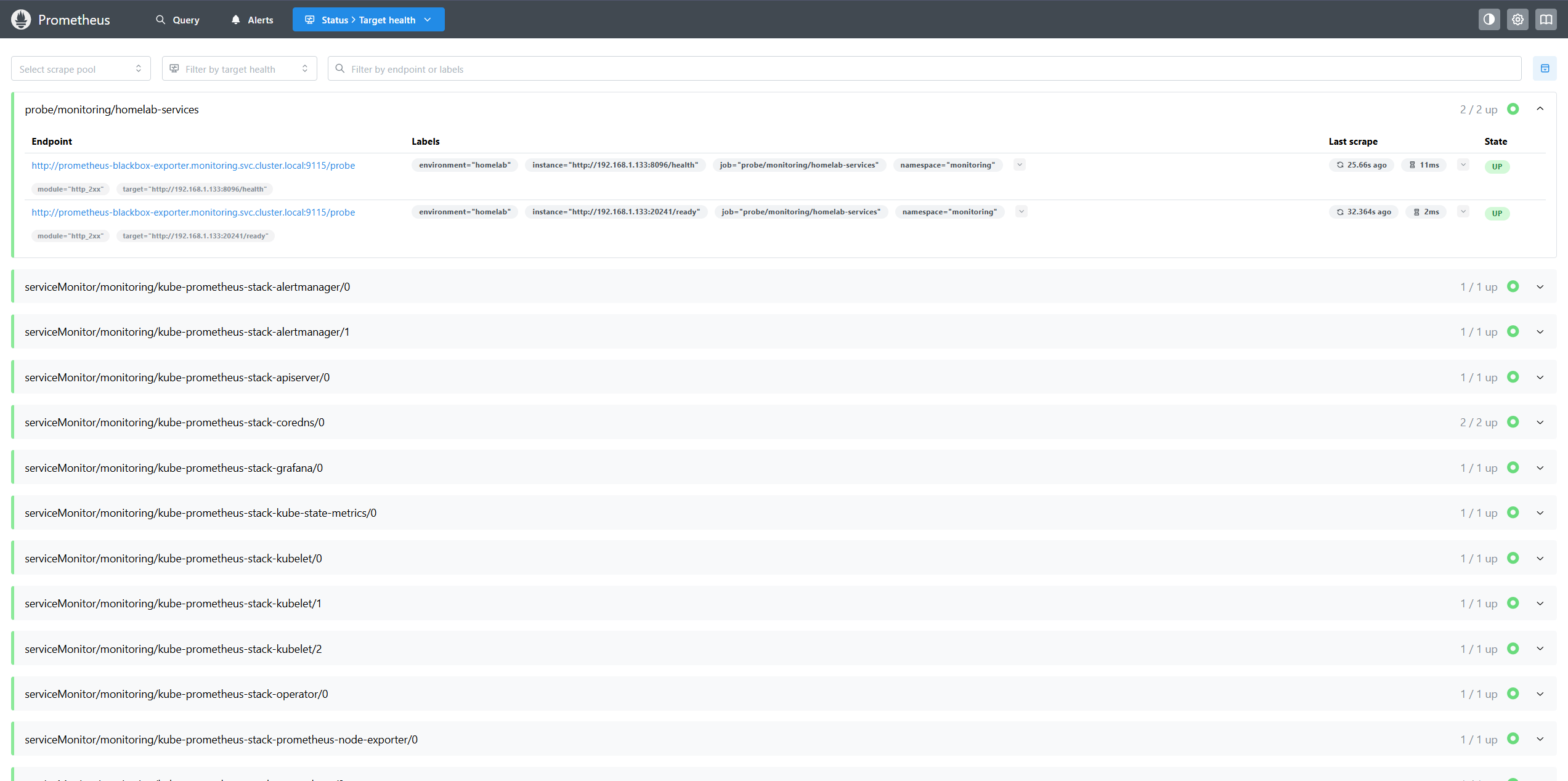
Prometheus targets page showing all scrape targets as UP

The Prometheus Operator manages scrape configurations through ServiceMonitor resources. The following monitors are active in the monitoring namespace:

ServiceMonitorPurpose
kube-prometheus-stack-alertmanagerAlertManager metrics
kube-prometheus-stack-apiserverKubernetes API server
kube-prometheus-stack-corednsCoreDNS query metrics
kube-prometheus-stack-grafanaGrafana health
kube-prometheus-stack-kube-state-metricsKubernetes object state
kube-prometheus-stack-kubeletKubelet and cAdvisor metrics
kube-prometheus-stack-operatorPrometheus Operator itself
kube-prometheus-stack-prometheusPrometheus self-monitoring
kube-prometheus-stack-prometheus-node-exporterHost metrics
prometheus-pushgatewayBatch job metrics
traefikTraefik request metrics (used by Argo Rollouts canary analysis)

Log aggregation is handled by the Loki + Alloy combination. Loki stores logs in a compact, indexed format queryable with LogQL. Alloy is the modern replacement for Promtail β€” a fully programmable pipeline agent.

K8s pods (all namespaces) Host systemd journal
β”‚ β”‚
β””β”€β”€β”€β”€β”€β”€β”€β”€β”€β”€β”€β”€β”€β”€β”¬β”€β”€β”€β”€β”€β”€β”€β”€β”€β”€β”€β”€β”€β”€β”€β”€β”€β”€β”˜
β”‚
Grafana Alloy (DaemonSet)
(runs on every node)
- tails container logs
- reads systemd journal
- adds labels (namespace, pod, app)
β”‚
β–Ό
Loki (monolithic mode)
5-day retention / 5 GiB PVC
β”‚
β–Ό
Grafana Explore (LogQL queries)

Alloy runs as a DaemonSet ensuring it’s present on every node. The loki-canary DaemonSet is a companion service that continuously writes test log entries to Loki and verifies they can be read back β€” providing a live health check of the log ingestion pipeline.

# All logs from a namespace
{namespace="harbor"}
# Host systemd journal logs
{job="systemd-journal"}
# Filter by systemd unit
{job="systemd-journal"} |= "AdGuardHome"
# Error-level journal entries
{job="systemd-journal"} | detected_level="error"
# Logs from a specific pod
{pod="n8n-c955cdc45-cxr6b"}

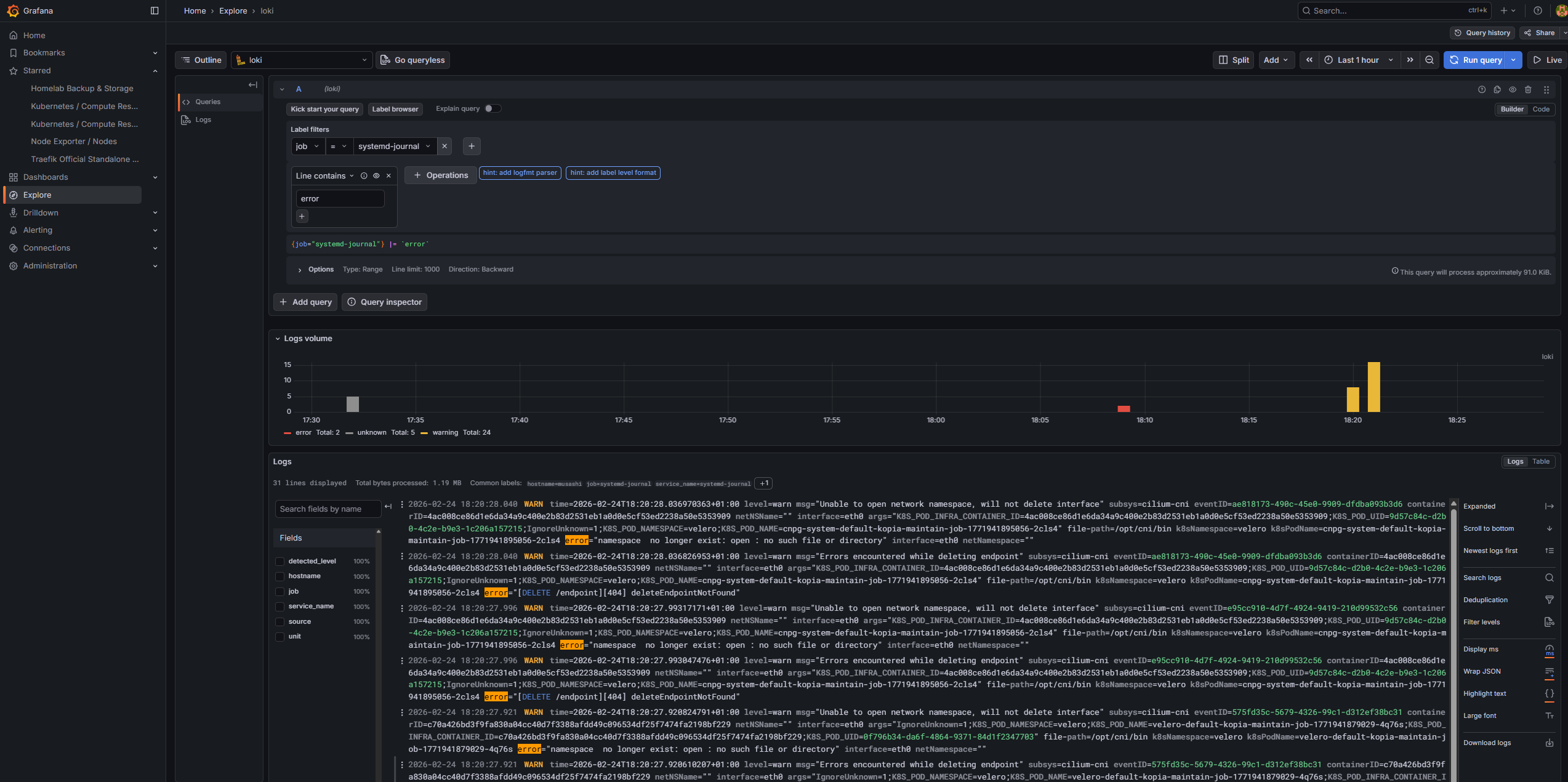
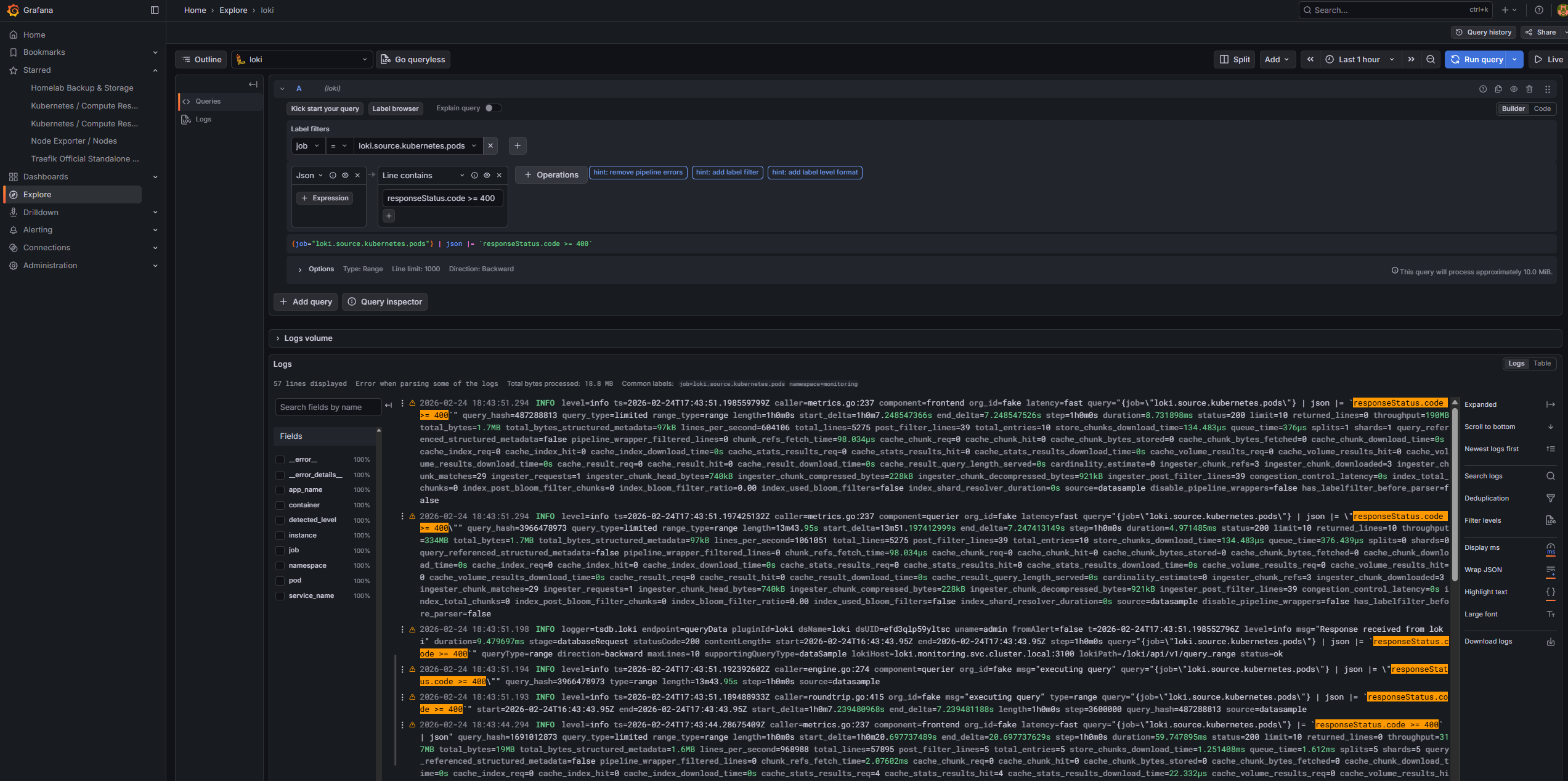
Grafana Explore β€” Loki log stream showing Kubernetes HTTP errors by namespace

Grafana Explore β€” Loki log stream showing systemd journal errors from host services

Grafana serves as the single pane of glass for all metrics and logs, accessible at https://grafana.kubefurlan.com via Cloudflare tunnel.

NameTypeEndpoint
PrometheusprometheusAuto-configured by kube-prometheus-stack
Lokilokihttp://loki.monitoring.svc.cluster.local:3100
AlertmanageralertmanagerAuto-configured

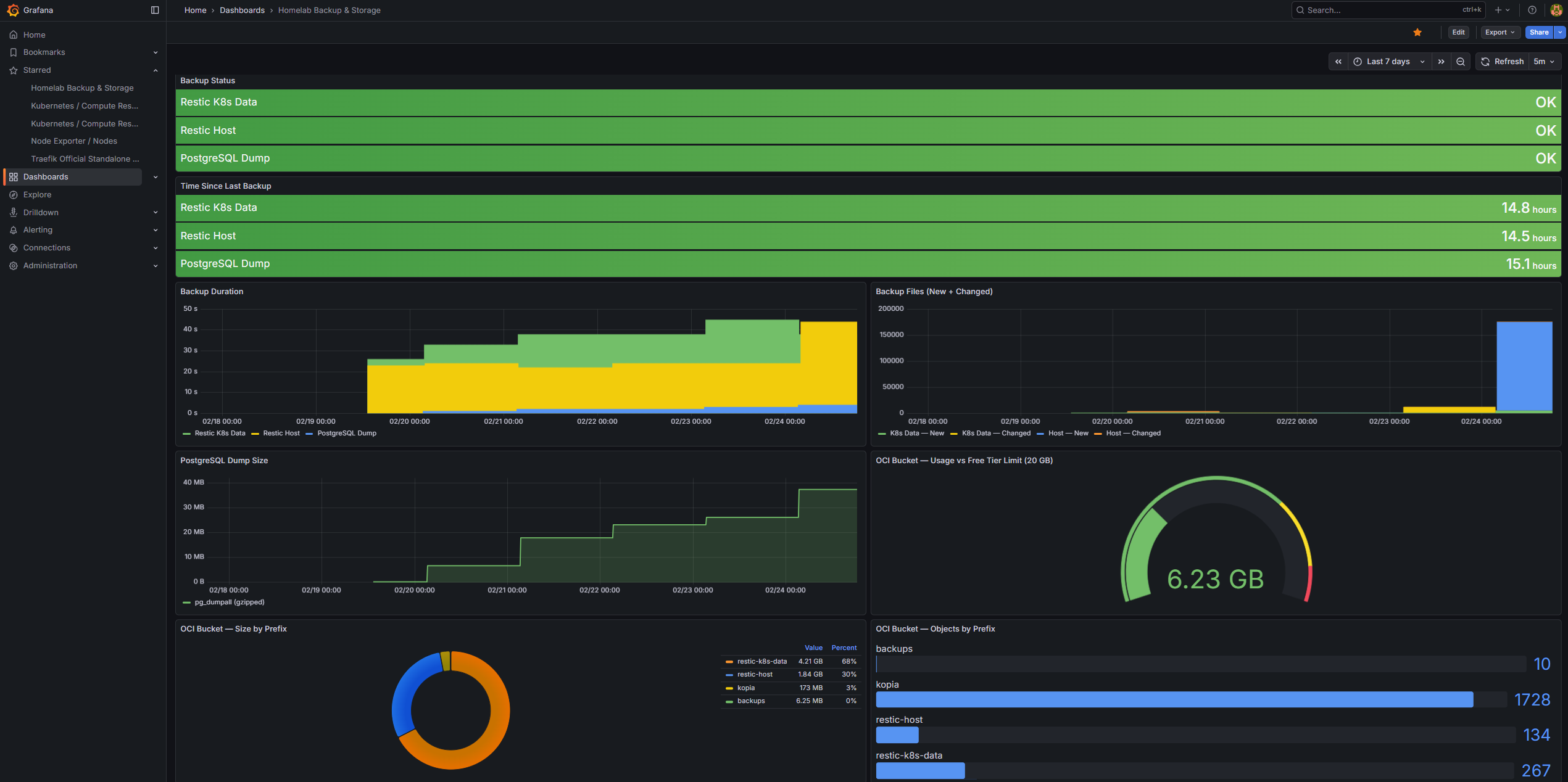
A fully custom dashboard tracks the backup and storage posture of the cluster. It ingests metrics pushed to Pushgateway by all four backup layers β€” Velero + Kopia, restic PVC data, pg_dumpall, and host configuration β€” and surfaces backup status, duration trends, PostgreSQL dump size over time, and OCI Object Storage usage against the 20 GB free tier limit.

Full dashboard documentation and panel breakdown β†’

Custom Grafana "Homelab Backup & Storage" dashboard showing backup status across all layers

DashboardPurpose
Node Exporter / NodesHost CPU, memory, disk, network
Kubernetes / Compute Resources / ClusterCluster-wide resource usage
Kubernetes / Compute Resources / Namespace (Pods)Per-namespace breakdown
Kubernetes / Persistent VolumesPV usage tracking
CoreDNSDNS query rates and errors
Grafana OverviewGrafana self-health

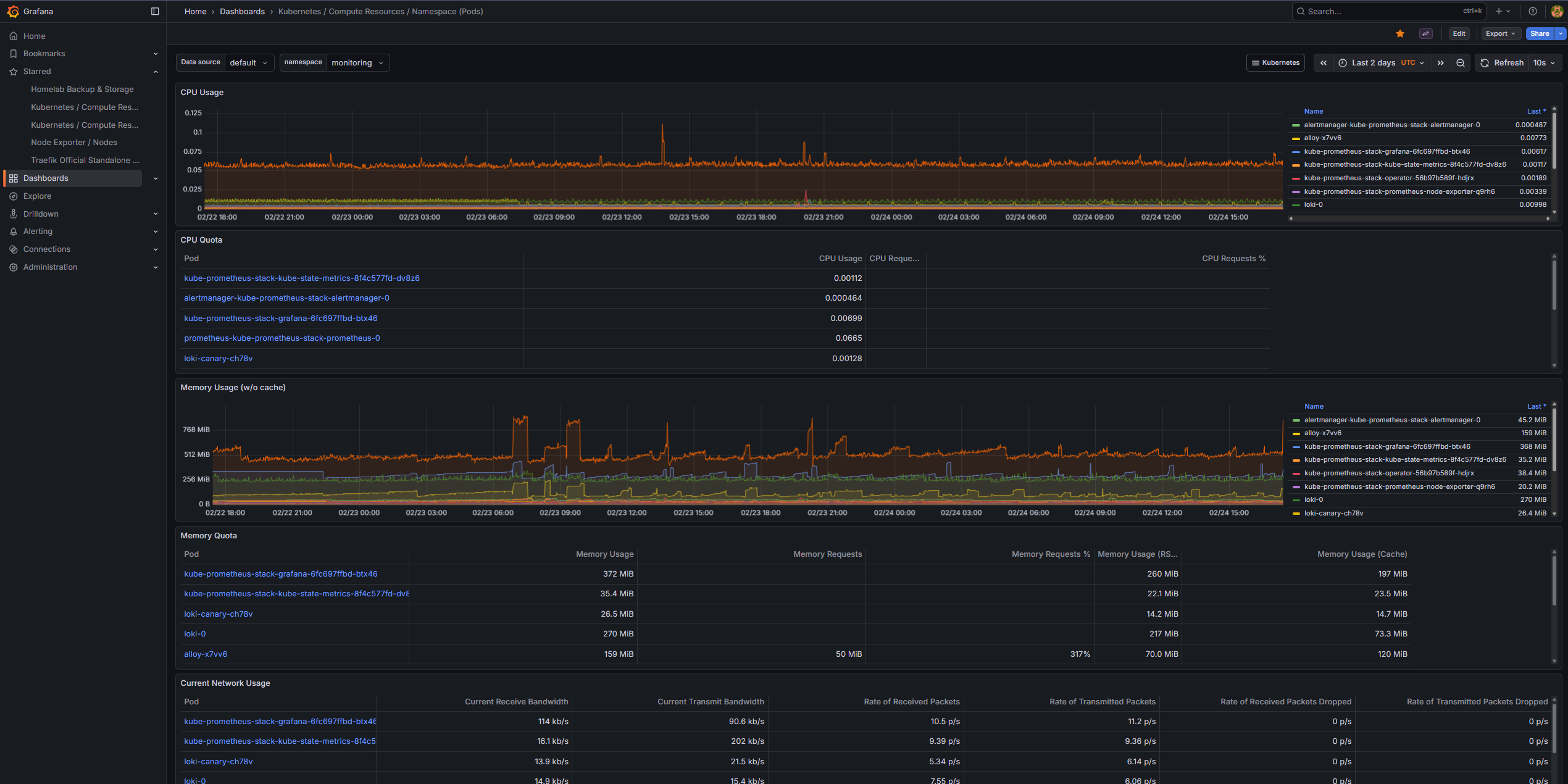
Grafana Kubernetes cluster resource usage dashboard β€” CPU, memory, and workload metrics

AlertManager receives fired alerts from Prometheus and routes them to the appropriate notification channels.

A custom PrometheusRule resource defines homelab-specific alerts:

AlertConditionSeverityFor
BackupFailedbackup_success == 0critical5m
BackupStaleTime since last run > 48hwarning5m
HighMemoryUsageMemory > 90%warning5m
HighCPUUsageCPU > 90%warning10m
HighDiskUsageRoot filesystem > 90%critical5m
HostRestartedUptime < 5 minuteswarning0m
JellyfinDownHTTP probe fails on :8096critical3m
CloudflareTunnelDownHTTP probe fails on :20241critical3m
OCIBucketNearLimitBucket usage > 85% of 20 GBwarning5m
RouteReceiverDestination
severity = criticalcriticalTelegram bot + Gmail
All other alertsdefaultTelegram bot + Gmail
WatchdognullSilenced
InfoInhibitornullSilenced

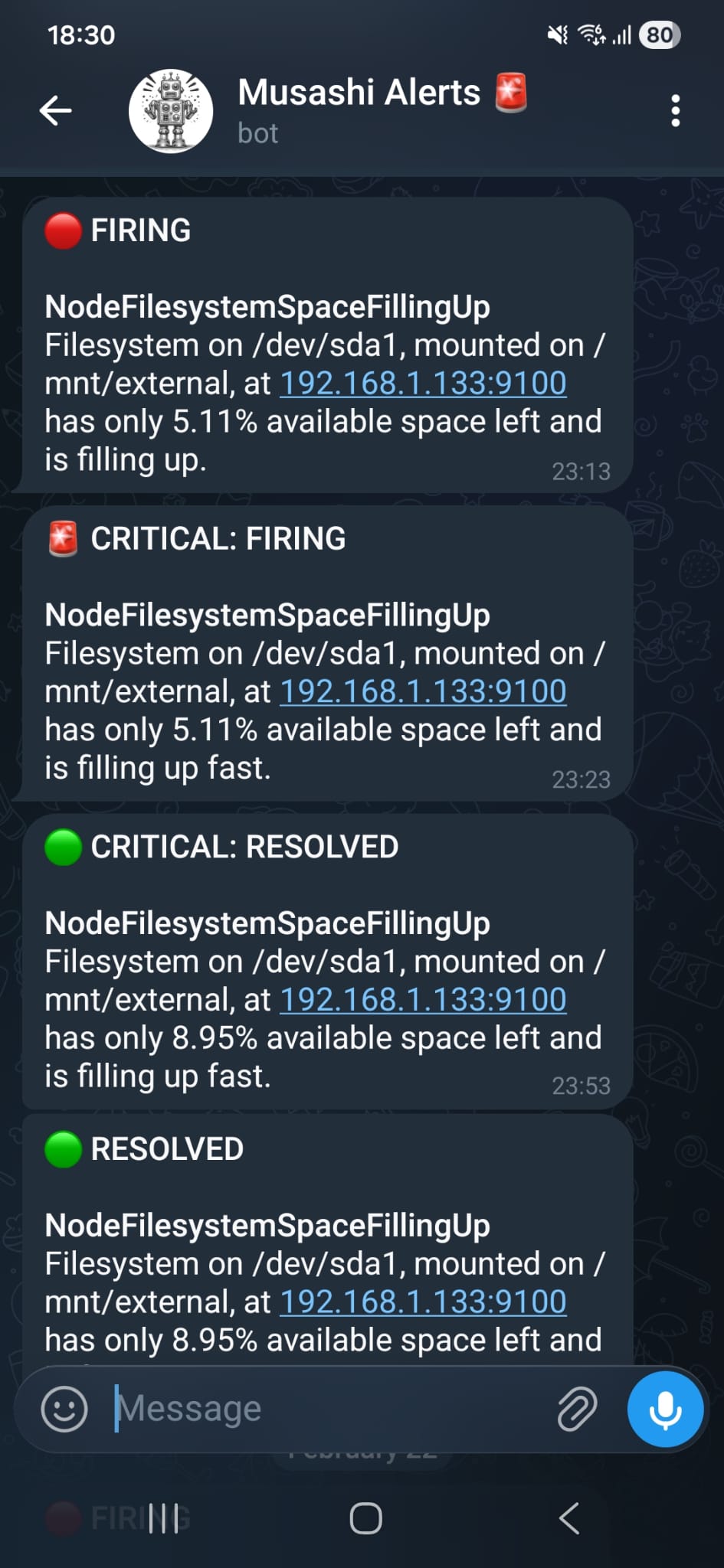
Critical alerts are sent immediately to both a Telegram bot (musashi_homelab_bot) and a Gmail address. The dual-channel approach ensures notifications are received even if one channel is unavailable.

AlertManager notification via Telegram bot β€” critical alert example

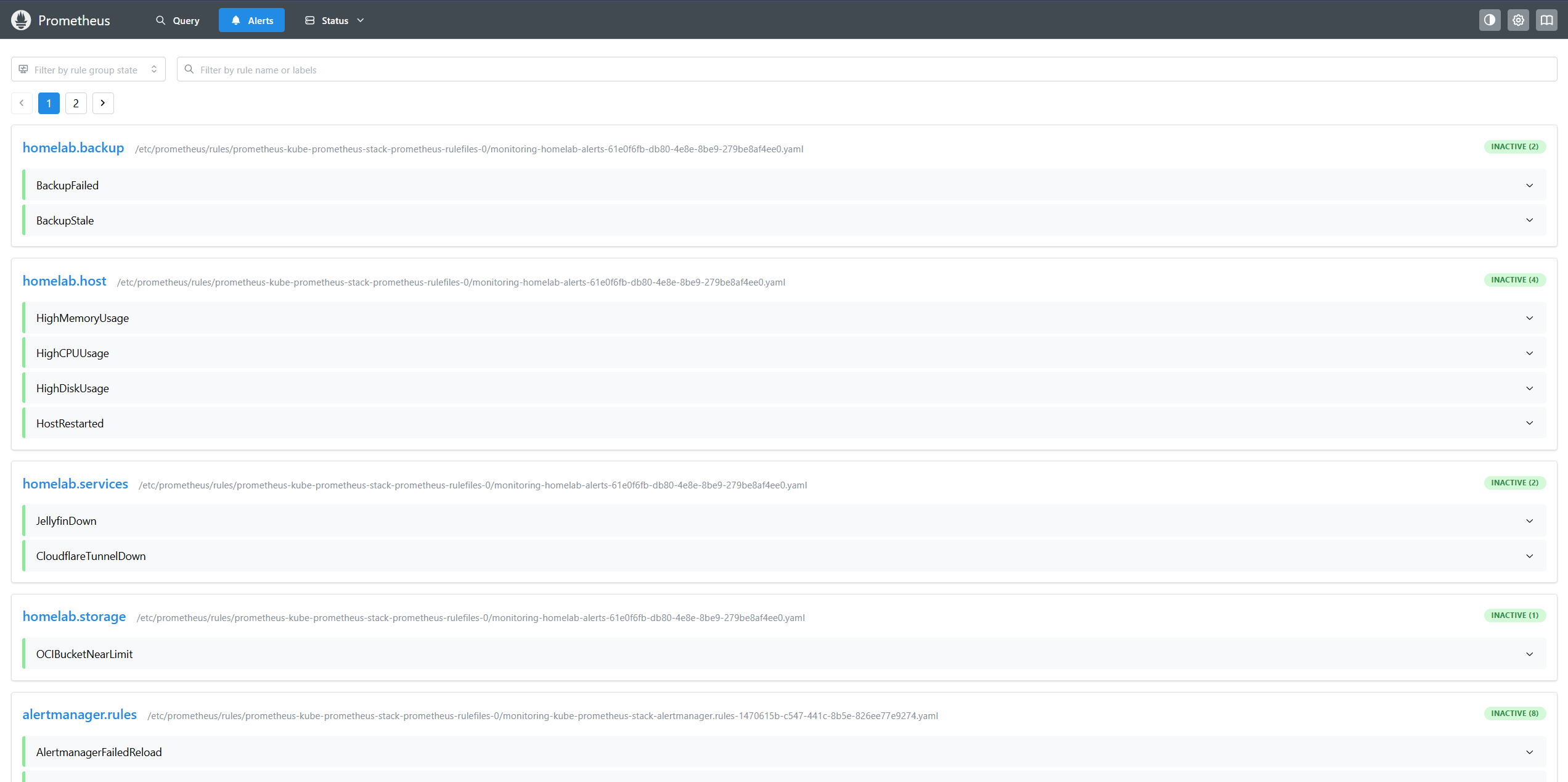
Prometheus alerts page showing active alert rules and their states

The observability stack doesn’t just monitor β€” it actively gates deployments. During every canary rollout of Backstage, Argo Rollouts queries Prometheus for real-time application health metrics derived from Traefik’s ServiceMonitor:

Canary deployment starts
β”‚
β–Ό
Argo Rollouts creates AnalysisRun
β”‚
β–Ό (every 30s)
Prometheus queries:
β”Œβ”€β”€β”€β”€β”€β”€β”€β”€β”€β”€β”€β”€β”€β”€β”€β”€β”€β”€β”€β”€β”€β”€β”€β”€β”€β”€β”€β”€β”€β”€β”€β”€β”€β”€β”€β”€β”€β”€β”€β”€β”€β”€β”€β”€β”€β”€β”
β”‚ error-rate: β”‚
β”‚ traefik_service_requests_total{code="5xx"} β”‚
β”‚ Γ· traefik_service_requests_total β”‚
β”‚ β†’ must be ≀ 0.25 β”‚
β”‚ β”‚
β”‚ p95-latency: β”‚
β”‚ histogram_quantile(0.95, β”‚
β”‚ traefik_service_request_duration_bucket) β”‚
β”‚ β†’ must be ≀ 5s β”‚
β”‚ β”‚
β”‚ pod-restarts: β”‚
β”‚ kube_pod_container_status_restarts_total β”‚
β”‚ β†’ must be < 2 β”‚
β””β”€β”€β”€β”€β”€β”€β”€β”€β”€β”€β”€β”€β”€β”€β”€β”€β”€β”€β”€β”€β”€β”€β”€β”€β”€β”€β”€β”€β”€β”€β”€β”€β”€β”€β”€β”€β”€β”€β”€β”€β”€β”€β”€β”€β”€β”€β”˜
β”‚
β–Ό
Pass: continue canary β†’ 100% promotion
Fail: automatic rollback to stable version

This turns Prometheus from a passive observer into an active safety gate, automatically protecting production from bad deployments.
ComponentRetentionStorage
Prometheus5 days10 GiB PVC (local-path)
Loki5 days (120h)5 GiB PVC (local-path)
AlertManagerN/A (config only)1 GiB PVC (local-path)
GrafanaN/A (dashboards + config)5 GiB PVC (local-path)

All PVCs are stored under /opt/local-path-provisioner/ on the host SSD and are included in the daily restic backup to OCI Object Storage.

ComponentMemory
Prometheus~400–600 MB
Grafana~150–200 MB
Loki~256–400 MB
Alloy~128–200 MB
AlertManager~50 MB
kube-state-metrics~50 MB
node-exporter~30 MB
Pushgateway~20 MB
Blackbox Exporter~20 MB
Total~1.1–1.6 GB